Broadcast-Safe Live Streaming from OBS/vMix with Quickstream

Modern broadcast playout systems require fully standards-compliant video signals to operate reliably. This applies not only to codecs and bitrates, but also to stream structure, timing accuracy, and transport stability.
Production tools such as OBS Studio are widely used for live production, but their output is not always suitable for direct playout ingest. OBS is used as an example in this article because it is free, available to everyone, and extremely popular; however, the same technical limitations and issues apply to commercial production software such as vMix. All recommendations and workflows described below can be applied analogously to vMix-based setups.
This article explains common pitfalls and presents recommended workflows for integrating OBS with Quickstream in a broadcast-safe way.
The Problem: OBS Output vs Broadcast Requirements
OBS → MPEG-TS → SRT
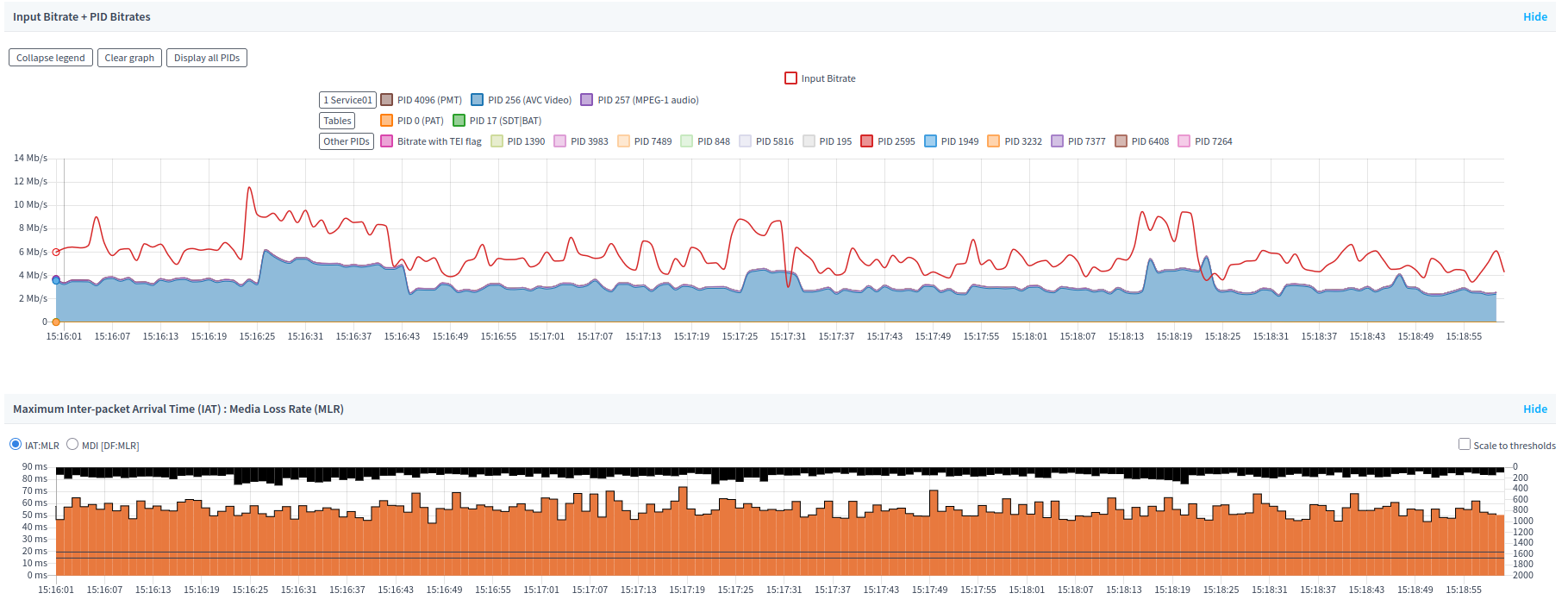
OBS allows sending live streams as MPEG-TS over SRT, which is convenient and commonly used. In practice, however:
- MPEG-TS generated by OBS is not fully broadcast-compliant
- Common issues include:
- incorrect or unstable TS structure
- missing or unstable PCR / PTS / DTS timestamps
- encoder parameters rejected by playout systems
As a result, such streams must not be ingested directly into a playout system, including Quickstream when operating in playout mode.
OBS → NDI (Direct Ingest)
Additional limitations apply when attempting to use NDI directly as a playout source.
- Many playout systems do not support NDI ingest at all
- NDI is a production interface, not a broadcast delivery format
- NDI cannot be transported over SRT or other contribution protocols
- It is not designed for long-distance transport over WAN or the public internet
- NDI is intended for studio-grade workflows strictly within a local LAN environment
As a result, NDI should never be used directly as a playout input in most cases. It must first be ingested, encoded, and normalized by a system such as Quickstream before being delivered to broadcast playout.
Quickstream as a Transcoding and Normalization Layer
Quickstream can act as an intermediate processing layer between production tools and the playout system:
- ingesting live streams from OBS
- performing full real-time transcoding
- fixing timing, stream structure, and encoder compliance
- delivering a signal ready for broadcast or further distribution
This architecture reflects real-world broadcast workflows, where production and emission are strictly separated.
Recommended Integration Scenarios
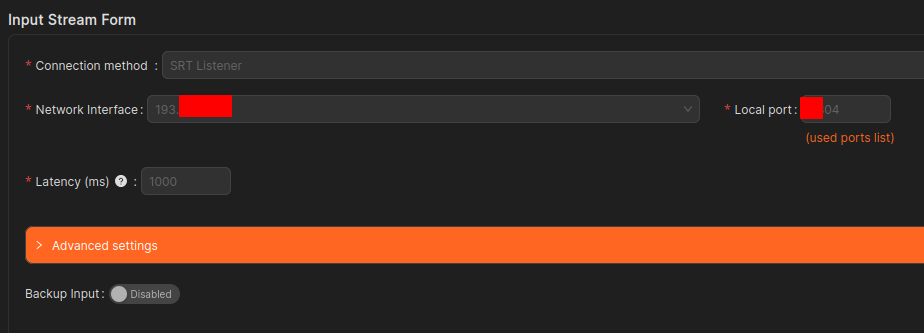
Scenario 1: OBS → MPEG-TS (SRT) → Quickstream
This workflow is acceptable, provided that:
- Quickstream is used as a transcoder
- the OBS-generated stream does not go directly to playout
- full re-encoding is performed inside Quickstream
Logical flow:
OBS → MPEG-TS / SRT → Quickstream (transcoding) → Quickstream Playout
Scenario 2 (Recommended): OBS → NDI → Quickstream Encoding
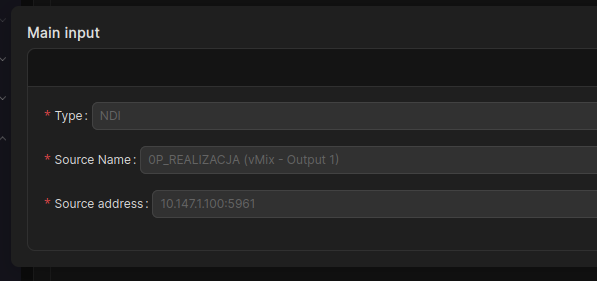
The preferred approach is to use OBS purely as a production tool and output NDI, then:
- ingest NDI into Quickstream
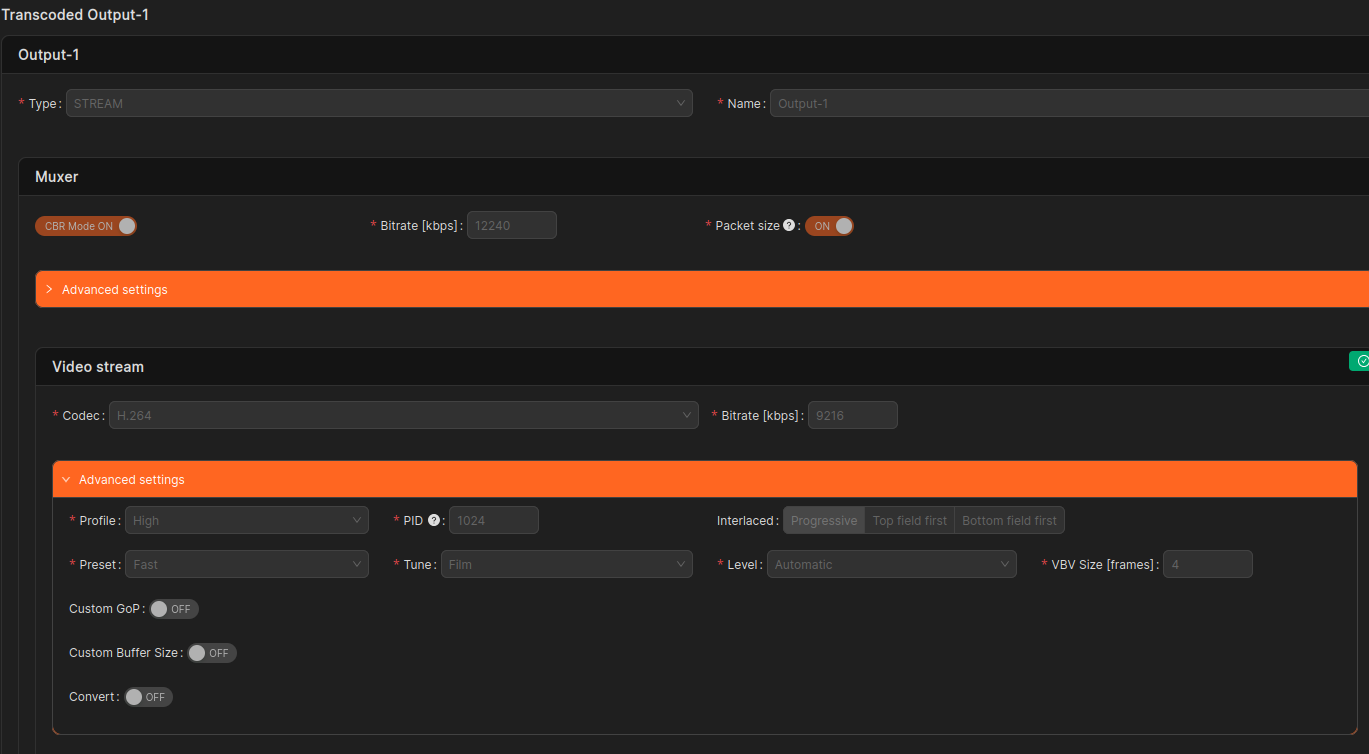
- encode and normalize the signal in Quickstream
- deliver a fully broadcast-compliant stream to playout
Why this works better:
- no encoder limitations imposed by OBS
- full control over encoding parameters
- improved stability and predictability
- compliance with playout system requirements
Logical flow:
OBS → NDI → Quickstream (encoding + normalization) → Quickstream Playout
NDI as a Production Interface
NDI should always be treated as a production-layer protocol, not an emission format. Quickstream enables safe use of NDI by:
- decoding NDI input
- re-encoding to a broadcast format
- producing a fully standards-compliant output stream
Applicability to vMix
The same principles apply to vMix:
- vMix → MPEG-TS / SRT → Quickstream (transcoding)
- vMix → NDI → Quickstream (transcoding) (recommended)
From the playout system’s perspective, the production software itself is irrelevant — signal quality and compliance are what matter.
Architecture Overview
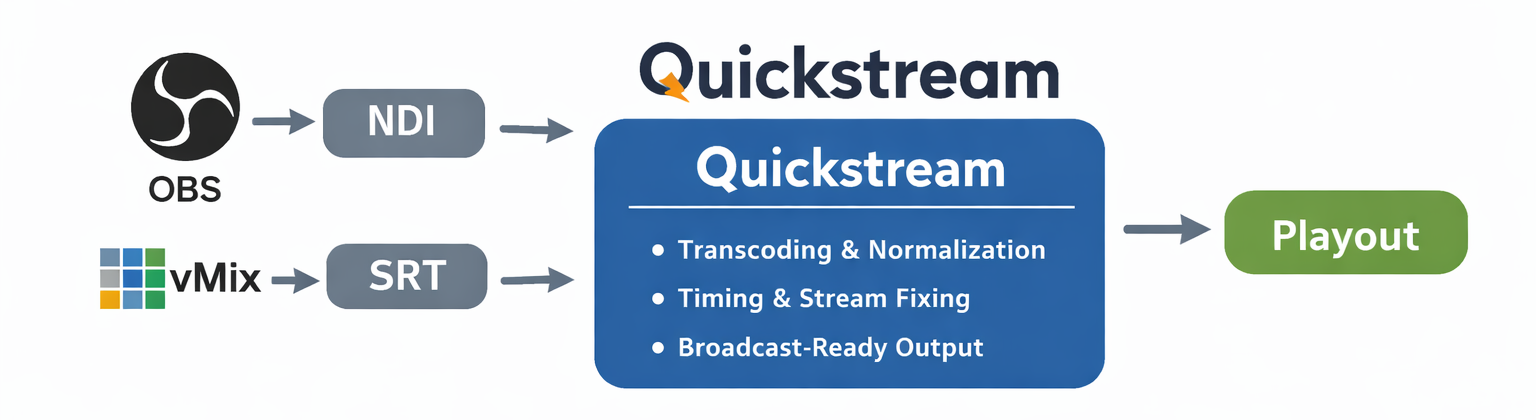
Summary
- OBS-generated MPEG-TS streams over SRT are not fully broadcast-compliant
- NDI must not be used directly as a playout signal
- Quickstream can transcode, normalize, and stabilize incoming streams
- Best practice: output NDI from OBS and perform encoding in Quickstream
- This workflow ensures stability, compliance, and operational safety
Encoding profile
You can save this JSON as a file and import it in Quickstream Cloud.
{
  "exportDate": "2026-01-27T14:22:01.854Z",
  "version": "5.0",
  "channelConfig": {
    "audioStreamsCount": 1,
    "backupReturnMsecs": 5000,
    "backupSwitchMsecs": 500,
    "configTimestamp": 1755682634926,
    "description": "",
    "emergencyMode": "none",
    "emergencyReturnMsecs": 5000,
    "emergencySwitchMsecs": 1000,
    "globalAudioFormats": [
      {
        "channels": 2,
        "sampleFormat": "S16",
        "sampleRate": "44100"
      }
    ],
    "globalVideoFormat": {
      "customSar": false,
      "fps": "50",
      "height": 1080,
      "interlaced": 0,
      "pixFormat": "YUV420P",
      "presetId": 2,
      "resize": "pad",
      "width": 1920
    },
    "mainInput": {
      "inputId": 1,
      "inputName": "main",
      "streamAddr": "172.16.0.1:5961",
      "streamSource": "0P_REALIZACJA (vMix - Output 1)",
      "type": "inputNdi"
    },
    "name": "Example NDI Transcoding",
    "outputs": [
      {
        "audioStreams": [
          {
            "audioCodec": {
              "aacProfile": "aac_he",
              "b": 256,
              "type": "Aac"
            },
            "audioStreamSelector": 0,
            "convert": false,
            "outputId": 8,
            "pid": 1025
          }
        ],
        "maxDelayTweak": 0,
        "mpegtsCBRForcePacketSize": true,
        "mpegtsCBRMode": true,
        "mpegtsCBRMuxrate": 12240,
        "mpegtsOriginalNetworkId": 1,
        "mpegtsPmtStartPid": 1023,
        "mpegtsServiceId": 1,
        "mpegtsServiceName": "Quickstream",
        "mpegtsServiceProvider": "Quickstream",
        "mpegtsStartPid": 1024,
        "mpegtsTransportStreamId": 1,
        "name": "Output-1",
        "outputId": 5,
        "type": "outputUrl",
        "urlDestinations": [
          {
            "destinationAddress": "192.168.0.0",
            "destinationPort": 1234,
            "encryptionEnabled": false,
            "interfaceIp": "automatic",
            "localPort": 0,
            "outputId": 6,
            "outputName": "Destination-0 Output-1",
            "setIPTOS": false,
            "setIPTTL": false,
            "setStreamId": false,
            "srtLatency": 1000,
            "srtOverhead": 25,
            "type": "outSrtCaller"
          }
        ],
        "videoStream": {
          "convert": false,
          "outputId": 7,
          "pid": 1024,
          "videoCodec": {
            "b": 9216,
            "changeGOP": false,
            "interlaced": 0,
            "type": "X264",
            "x264Level": "automatic",
            "x264Preset": "fast",
            "x264Profile": "high",
            "x264Tune": "film",
            "x264VbvBufsize": 4
          }
        }
      }
    ],
    "type": "transcoding",
    "version": "5.0"
  }
}


