Managing service
Linux-based operating systems
ℹ️
Superuser
All commands must be run as a superuser (usually root). You can run a command as superuser if you log on into superuser account or run them using sudo. You can skip sudo in all commands if you are logged as superuser.All commands must be run as a superuser (usually root). You can run a command as superuser if you log on into superuser account or run them using sudo. You can skip sudo in all commands if you are logged as superuser.
All commands must be run as a superuser (usually root). You can run a command as superuser if you log on into superuser account or run them using sudo. You can skip sudo in all commands if you are logged as superuser.All commands must be run as a superuser (usually root). You can run a command as superuser if you log on into superuser account or run them using sudo. You can skip sudo in all commands if you are logged as superuser.
Checking service status
To check service status type:
systemctl status quickstream5.serviceStarting service
To start a service type:
sudo systemctl start quickstream5.serviceStopping service
To stop a service type:
sudo systemctl stop quickstream5.serviceRestating service
To restart a service type:
sudo systemctl restart quickstream5.serviceDisabling service
To disable (remove from autostart) a service type:
sudo systemctl disable quickstream5.serviceEnabling service
To enable (add to autostart) a service type:
sudo systemctl enable quickstream5.serviceWindows
ℹ️
Administrator permissions required
You need Administrator permissions to install Quickstream Node. In non Active Directory environment, your user needs to be a member of Administrator groups. In Active Directory environment you need at least Local Administrator permissions.
You need Administrator permissions to install Quickstream Node. In non Active Directory environment, your user needs to be a member of Administrator groups. In Active Directory environment you need at least Local Administrator permissions.
Open services.msc by typing services.msc in the search bar in Windows or in Runcommand window (Windows button + R). You can also manage service by using the sc command or Powershell cmdlets.
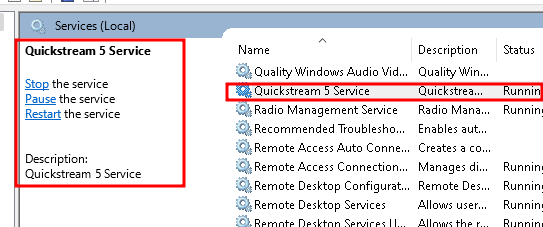
In the service window, you may start and stop the Quickstream Node service as displayed in the screenshot above. In service setting it is possible to start in the Manual or Automatic (autostart) mode.
Updated on Jan 26, 2026


